
Changes Made 2 - Google Forms Quiz
- Seri Park

- May 5, 2020
- 4 min read

My Blog Post url
Designing Online Quiz - Discourse Completion Quiz
Instruction
Create an online quiz using Google Forms and have it done by at least 3 people.
1) Create an online quiz using Google Forms with 3 questions. Each question should be of a different type (e.g. multiple choice, check boxes, dropdown menu, short answer, multiple choice grid), and should also have a picture or a video accompanying the question. Please include the number of points awarded, and answer key for each question.
2) Send your quiz to 3 people and ensure that they do it.
3) Their overall results can be obtained from the “Responses” tab in Google Forms, as well as in the Excel sheet. Please download the Excel sheet and type the link of your survey on the top left hand corner of the sheet. Upload this Excel file with the survey link typed on the top left hand corner, to the Snowboard as an assignment.
Feedback from professor & peers (who took the test)

I got some feedbacks from professor regarding assignment 2: Google Form Quiz
1) For question 1, how will you response?
2) What is your desired response?
3) Are you looking for one possible answer or more than one?
4) Your instruction requires to choose the best response, which means you are looking for only one answer. However, you are using checkbox-typed questions, which implies you are expecting more than one correct answer. The question and the answer form contradict each other.
I also got feedback from my friends who actually took the tests that I made.

One respondent replied that for Question 2, she did know the answer but she misunderstood the question since the instruction was not clear enough that she thought she had to give the highest point to the most appropriate sentence (whereas she should have given number 1 to the most appropriate sentence, and number 3 to the least appropriate sentence.)

Another respondent replied that for Question 3, she was corrected as wrong for answering <I cannot go to the party because I am afraid of water, and I cannot swim>, where the example answer I gave to the respondents was <To be honest, I cannot swim, but I can still celebrate your birthday!>.
Therefore, based on this feedback I got from the professor and respondents, I made five changes to the Google Form Quiz and reflection.
Five changes I made
1. Changed the Question-type of Question number 1
(From check type to multiple-choice question)

Since Question 1 only requires ONE appropriate answer, I changed the format of question type from 'Check type' to 'Multiple-choice' question. Therefore, the students will no longer choose more than one answer to Question 1.
2. Changed the contents of Question number 1
(To avoid confusion and clarify the objective of this question)

Before the change, the choices for Question 1 was quite vague, since all of the answers might make sense. The given situation was that you have been late for meetings several times, and you are late again and that you have to react appropriately to your angry friends who have been waiting 30 minutes for you.
The given answers were
1) I can't tell you how deeply sorry I am.
2) The traffic was just terrible.
3) I am late, so what are you going to do about it?
4) I promise to be overly early next time.
However, some people might misunderstand this question and answer differently far from common sense. Therefore, I edited some answers as follows:
1) I am so sorry, I promise not to be late next time.
2) What time did you arrive?
3) What are we going to do today?
4) I am not late, you guys just came early.
5) I promise to be overly early next time.
My intended answer for Question 1 is answer 1, expressing how sorry you are and reacting appropriately to the angry friends. In order to make it clear, I changed the other options into more absurd ones so that there would be no more confusion.
3. Added more detailed guideline in Question 2
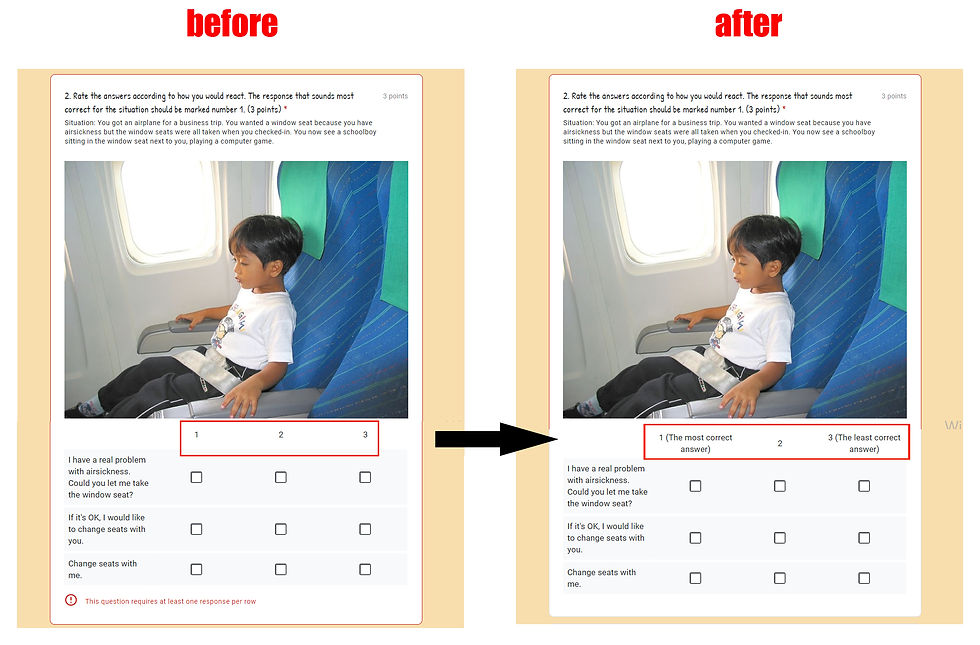
I got a feedback from my friend that she misunderstood the directions for Question 2, that she thought she had to give the biggest number to the most appropriate answer.
Even though I mentioned in the direction for Question 2, it might be confusing. Therefore, I added the brackets on each number like 1(the most correct answer) and 3(the least correct answer) so that respondents will not get confused.
4. Added the grading criteria / Feedback for Question 3

I also got another feedback from the respondent who took this test that Question 3 is a short answer question and that it should accept a variety of answers. Therefore, I unchecked the box <Mark all other answers as incorrect>, and also added a lot of possible answers.

In addition, for the feedback session, I added <I will mark your answer as correct. I accept a variety of answers, so don't worry.>
5. Reflection - adding my thoughts on Online Quiz / edit some grammar and language problems

I only stated the process of creating this online quiz. Therefore, I added my own reflections and what I learned from this assignment, adding another paragraph.


Comments